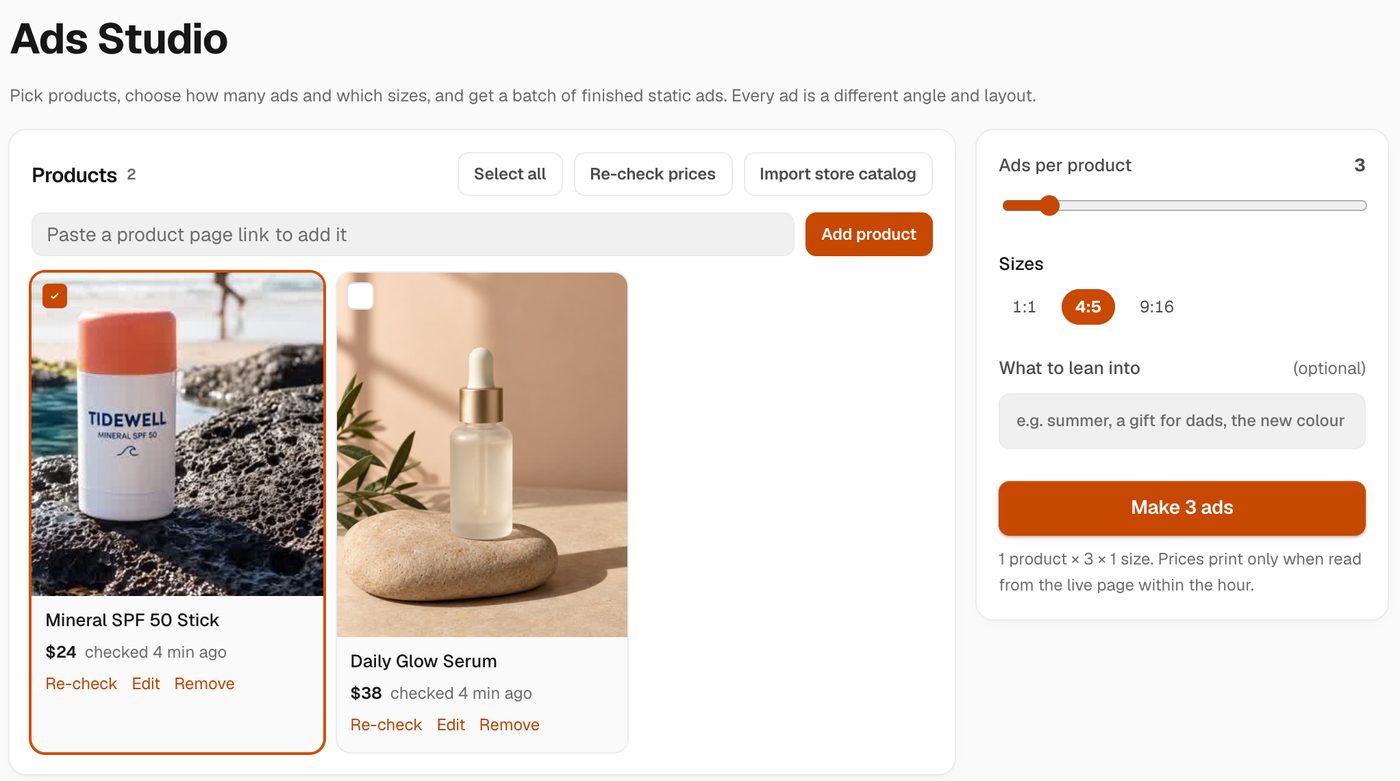
Static ads are quick to test, and the accounts that win test a lot of them. Making twenty variations by hand eats a week. Ads Studio makes them from your product catalog in one go: products, times ads per product, times sizes, with the price on the button before anything runs.
How does it work?
- Add your products. Paste a product page link, or import your store catalog in one click. Hermoso reads the title, price, photos, description and selling points from the page.
- Pick the products and how many ads each. Anywhere from 1 to 20 per product.
- Pick the sizes. Square 1:1, feed 4:5 and story 9:16, one or all three.
- Add what to lean into, if you like. "Summer", "a gift for dads", "the new colour".
- Press Make. The button shows what the batch costs before it runs. Ads appear below, grouped by product, as they finish.
Every ad is a different angle and layout
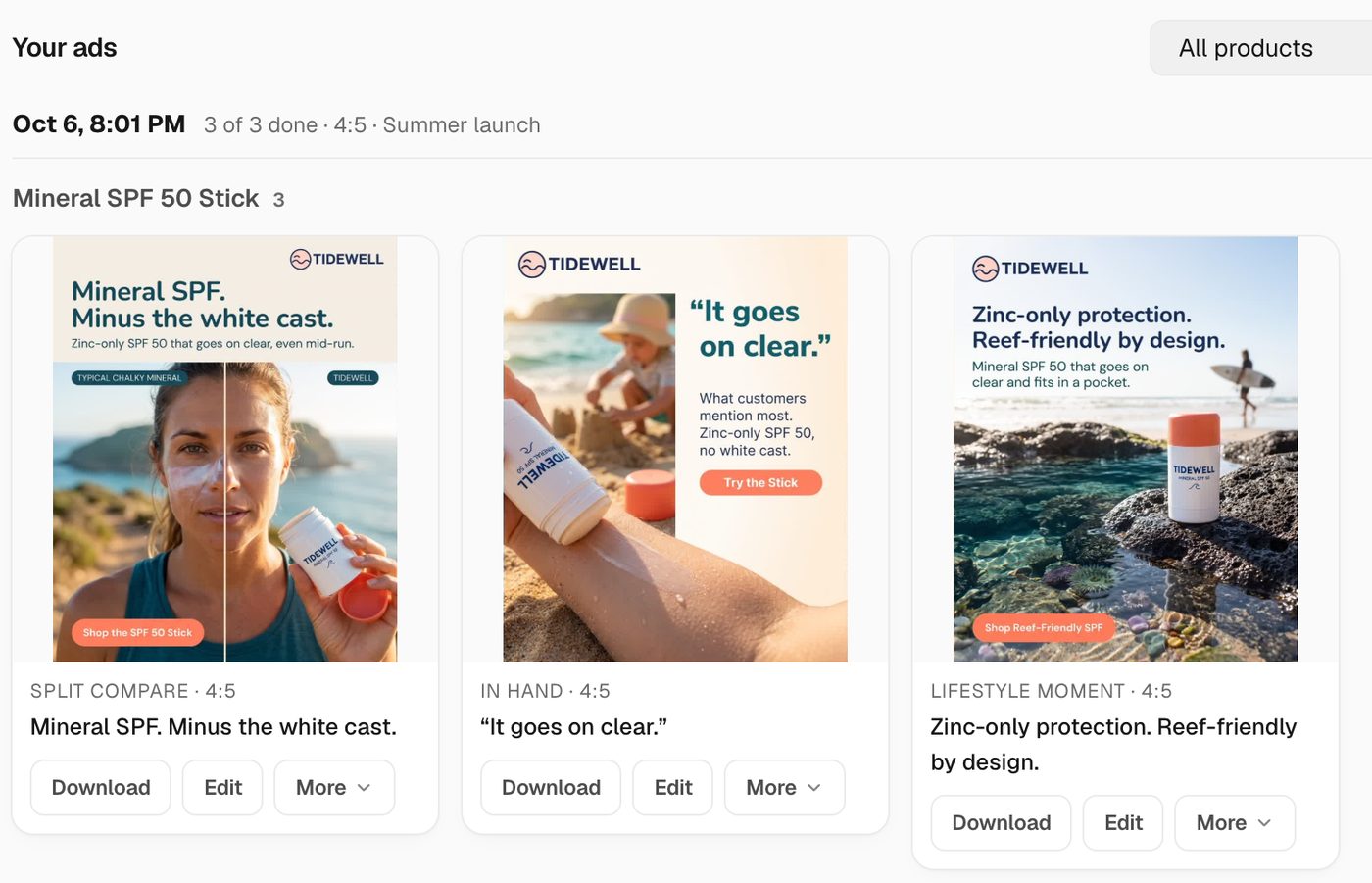
A batch of near-identical ads teaches you nothing. Before planning, each ad gets its own layout from eleven proven shapes, such as poster headline, lifestyle moment, in hand, packshot on colour, flat lay, split compare, feature callouts and native phone photo, plus its own type and call to action treatment. Neighbours never share a layout, and a 20-ad batch never repeats a combination.
Your real product, your real logo
Each ad is built from your own product photo, and the finished ad is checked against your product so the label, shape and colour stay yours. Your logo is the real file, placed on a clear corner, never redrawn by the model. If the planner wants the logo somewhere it would cover the product or a face, Hermoso moves it or makes it smaller.
Prices that are actually current
Your catalog is a copy of your live product pages, and the live page always wins. Before a batch, Hermoso re-reads any page it has not checked in the last hour, so a price only prints on an ad when it was read from your store within that hour. A price your page stopped showing is cleared, and anything you edited by hand is kept.
After the batch
Every ad lands in your Library. From any ad you can resize it to the other sizes, make headline variants, open it in the Studio to change it, schedule or post it to your channels, or use it in an ad campaign. Download all gives you the whole batch as one file.
From your AI agent
The same engine runs over the Hermoso MCP server, the CLI and the API. make_static_ads takes products, a count and sizes and returns the batch, and list_products, add_product, refresh_products, update_product and remove_product manage the catalog. In the Studio chat you can ask for it in words, like "four ads for each of my bestsellers, square and story", and press the priced Make button when it looks right.
Want a video instead? See the AI video ad maker, or clone any video ad for your brand. Looking for one image ad at a time? Try the AI image ad generator.
Frequently asked questions
What is Ads Studio?
A page in Hermoso that turns your product catalog into finished static ads in bulk. You pick products, how many ads each and which sizes, and every ad comes back in a different layout with your real product photo and logo.
How many ads can I make at once?
Up to 20 ads per product, for as many products as you select, in one, two or all three sizes (1:1, 4:5 and 9:16).
How do my products get in?
Paste a product page link, or import your store catalog. Hermoso reads the title, price, photos and description from the page. Reading a product page uses no credits.
Will the price on the ad be right?
A price only prints when it was read from your live product page within the last hour. Hermoso re-reads older pages right before a batch, and clears a price your page no longer shows.
Does it redraw my logo?
No. Your real logo file is placed on the finished ad in a clear corner, never painted by the model, and it is moved or made smaller if it would cover the product or a face.
Can I run it from Claude or ChatGPT?
Yes. Connect the Hermoso MCP server and ask for ads for your products. The make_static_ads tool runs the same engine as the web page.
What does it cost?
Each ad uses credits, and the Make button shows the price of the whole batch before anything runs.
Paste one product link and make your first batch. Start free, 250+ earnable free credits, no card.
Start free → See pricing