Posting every day is the part of marketing everyone knows works and nobody has time for. Autopilot does the daily part for you. It reads your brand, makes a new post for every slot on your calendar, writes a caption that fits each channel, and puts it on the schedule. You decide how much you want to see before anything goes out.
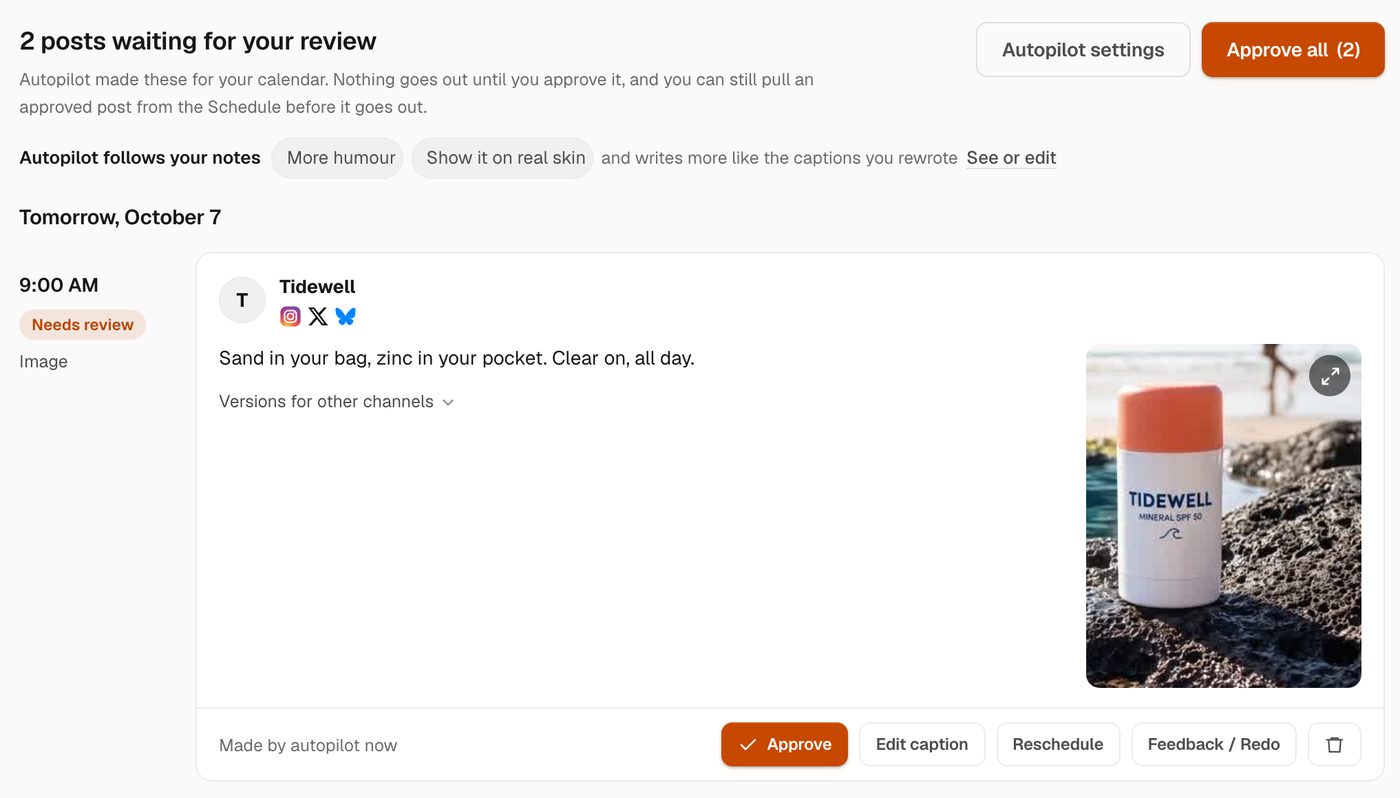
How do you set it up?
- Pick a goal. Grow followers, drive sales, promote a launch, or say what you want in a line. The goal shapes every idea.
- Pick a few topics. Hermoso suggests some from your brand. Every post picks one, so your feed stays varied.
- Choose where and when. Every connected channel can take part, each with its own number of posts a day, at your posting times.
- Choose a format. A mix, or only images, carousels or videos.
- Choose how posts go out. Review each batch first, or post automatically.
It takes about a minute, and nothing is posted until you turn it on.
Review first, or post automatically
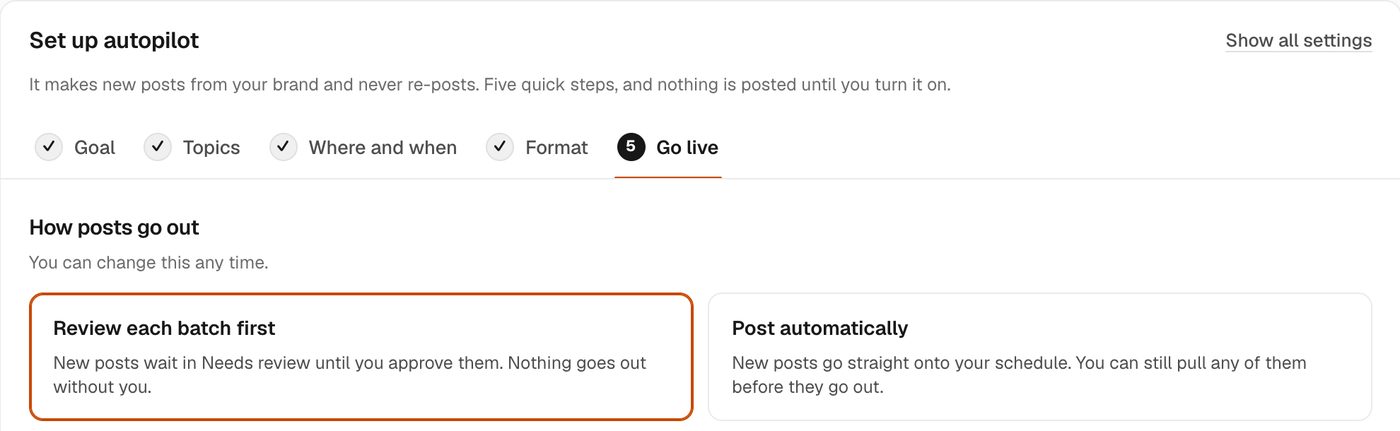
Review each batch first and new posts wait in Needs review. Approve one or approve them all, edit a caption, move a post to another time, ask for a redo with a note, or delete it. Nothing goes out without you.
Post automatically and new posts go straight onto your schedule. You can still open the Schedule and pull any of them before they go out. Most people start with review, and once you have approved a few batches Hermoso suggests switching. It never switches on its own.
It learns from your notes and from your results
Every bit of feedback becomes a note autopilot follows next time, like "more humour" or "show it on real skin". When you rewrite a caption, it writes more like your version. It also reads how your posts did and leans into what worked on each channel, compared channel by channel, because a hit on TikTok tells you little about LinkedIn. Your brand profile, products, saved ads and brand memory go into every post too.
Always new, never a re-post
Every post is made fresh for its slot: a new image, carousel or video, never something pulled back out of your Library. Logos stay off organic posts, so they read like posts and not like ads. If you want to post something you already have, put it on the social media scheduler yourself and autopilot counts it toward the day.
Where can it post?
On any channel you connect: Instagram, Facebook, TikTok, YouTube, X, LinkedIn, Threads, Pinterest, Bluesky and Telegram. Each channel gets its own number of posts a day, and a caption written for it.
Set it up by asking
In the Hermoso Studio you can say it in a sentence: "post twice a day on Instagram and Bluesky about our summer launch, let me review first". The Studio shows you the plan, how many posts a day and where, before you confirm. AI agents get the same controls through the Hermoso MCP server and CLI: set_post_refill sets it up, changes it or pauses it, get_post_refill shows the setup, and run_post_refill makes the next batch now. So Claude, ChatGPT or Cursor can run your posting calendar for you.
What does it cost?
Posting and scheduling are free on every plan. Credits are used only when autopilot makes a new image or video, and the setup screen shows roughly how many credits a day your settings will use before you turn it on. Pause it any time. If your credits run out, autopilot makes nothing and tells you, instead of posting half a batch.
Want replies handled too? DM automations answer comments and DMs on Instagram, Facebook, Messenger and X while autopilot keeps the feed going.
Frequently asked questions
What is social media autopilot?
It is a setting in Hermoso that makes new posts for your calendar every day: a fresh image, carousel or video, with a caption for each channel, based on your brand, your goal and your topics. You can review each batch before it goes out, or let it post automatically.
Will it post without my approval?
Only if you choose Post automatically. In review mode, which is where most people start, every new post waits in Needs review until you approve it.
Does it re-post my old content?
No. Every post is made new for its slot. It never re-posts anything from your Library. Posts you schedule yourself still count toward the day.
Which channels does it post to?
Any channel you connect: Instagram, Facebook, TikTok, YouTube, X, LinkedIn, Threads, Pinterest, Bluesky and Telegram, each with its own number of posts a day.
How does it get better over time?
It follows the notes you leave when you ask for a redo, writes more like the captions you rewrite, and reads how your posts performed on each channel so it can lean into what works there.
Can my AI agent control it?
Yes. Through the Hermoso MCP server and CLI, an agent can set it up, change it, pause it and make the next batch, with set_post_refill, get_post_refill and run_post_refill.
How much does it cost?
Posting and scheduling are free. Credits are used only when autopilot makes a new image or video, and the setup screen shows roughly how many a day before you turn it on.
Connect a channel, pick a goal, and the first batch is ready for your review. Start free, 250+ earnable free credits, no card.
Start free → See pricing