The best ad ideas show up while you scroll, and they are gone by the time you need them. Hermoso for Chrome keeps them. It adds a small Save and Clone button to ads in the public ad libraries and on short-form video posts, and everything you save lands in your Hermoso workspace.
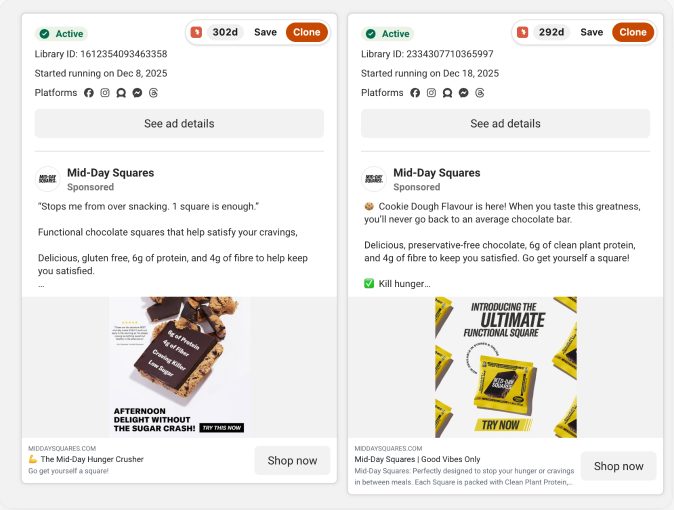
Save any ad in one click
Press Save and the ad goes into your swipefile with its copy, its picture or video and its link. It works on the Meta Ad Library and the LinkedIn Ad Library, on TikTok (Creative Center too), on Instagram and on YouTube Shorts. Hermoso keeps its own copy of the media, because platform links expire, so your saves still load months later.
Spot the winners at a glance
Ads that have run for 30 days or more show how long they have been running. An advertiser only keeps paying for an ad that works, so run length is one of the best public signals you can get. More on that in why run length beats likes.
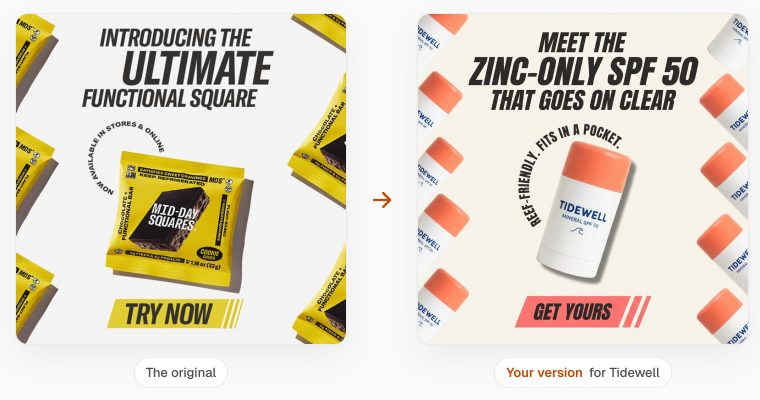
Clone it for your brand
Press Clone on any ad and Hermoso remakes it for you: the same idea and structure, with your product, your colours and your words. You see the price in credits before anything is spent, and a video clone asks twice, once for the plan and once for the render.
Research any company
On any company's website, open Hermoso from the toolbar and press Pull their ads. You get the ads they are running on Facebook and Instagram, how long each has run, and a teardown of their strategy. The same research lives in Ad Spy in the app.
Make an ad from any picture
Right-click a picture and choose Make an ad from this. Hermoso shows the price, then makes a new ad from it in your brand.
Share or schedule from the page
Share the page you are on, or right-click a picture, and post it now or schedule it on your connected channels, through the same scheduler as the app.
How do you sign in?
With your Hermoso account, or create one in the same window. The extension signs in through Hermoso's own sign-in page, so it never sees your password, and you can remove its access from MCP & CLI in the app at any time.
Frequently asked questions
Is the Hermoso Chrome extension free?
Yes, it is free to install, and saving ads to your swipefile uses no credits. Clones, new ads and company research use credits, and the price always shows before anything is spent.
Which sites does it work on?
The Meta Ad Library, the LinkedIn Ad Library, TikTok including Creative Center, Instagram and YouTube Shorts. The research button works on any company's website.
Where do saved ads go?
Into your Hermoso swipefile, in a collection called Saved from Chrome, with the copy, the media and the link. Hermoso keeps its own copy of the media so it still loads later.
What does the run length badge mean?
Ads that have been running for 30 days or more show how long. Advertisers stop paying for ads that do not work, so a long run is a strong sign an ad performs.
Do I need a Hermoso account?
Yes. Sign in with your Hermoso account, or create one in the same window. Everything you save or make lands in your Hermoso workspace at app.hermoso.ai.
Does it work in other browsers?
It is built for Chrome and installs from the Chrome Web Store. Other Chromium browsers that install Chrome Web Store extensions may work too.
Add Hermoso to Chrome, sign in, and save your first winner. Start free, 250+ earnable free credits, no card.
Start free → See pricing