A small agency sells the same week over and over: new creative for every client, posts going out on five or six channels, campaigns on Meta and usually one or two other ad platforms, and a report at the end of the month. Most teams stitch that together from a spy tool, a design tool, a scheduler, each ad manager and a spreadsheet. Hermoso puts the whole week in one place, kept separate per client, and lets your AI agent run any part of it for you.
One profile per client
Add a profile for every client you manage. There is no cap and no plan gate: unlimited profiles are included on every plan, Free too. Paste the client's website (or a short description, or a social handle if they have no site) and Hermoso builds the profile from their products, photos, logo, colours and voice.
Everything made for a client stays in that client's profile: its ads and library, its swipefile, what Hermoso remembers about the brand, and its chats. Switch clients from the profile menu and the whole workspace switches with them.
Your team, on the clients you choose
Invite a teammate by email to one client or to several. The invite link signs them straight in, and they land in the client you shared. A teammate sees only the profiles you share with them, never your billing or your other clients. There are two roles: admins can invite and remove people, members do the work. Renders a teammate starts are paid from the agency's credits, so there is one balance to watch.
Each client's channels and ad accounts, connected to their profile
Connect a client's Facebook Page, Instagram, TikTok, YouTube, LinkedIn and the rest on that client's profile, along with their ad accounts. You tick which pages and ad accounts a profile may use, and neither the Studio nor your AI agent can act on an account you have not ticked. Disconnecting one client's Meta leaves every other client's connection where it was.
Research what already works in the client's market
Before anything gets made, pull the ads a client's competitors are running from the Meta, Google, LinkedIn and TikTok ad libraries. Sort by how long an ad has been running to find the proven ones, get a teardown of the angles and hooks a competitor relies on, and save the best to that client's swipefile. More on the ad spy and competitor ad research pages.
Creative at agency volume
Make image and video ads in the client's brand with their real product in the shot: UGC-style videos with AI creators, product photos, static ads and template formats. Then make more of what works.
- Ad Multiplier. Take a client's best video and get new versions with a different person, outfit or location, keeping the cut, the pacing and the original audio. How it works.
- Clone an ad. Paste a TikTok, Reel, Facebook, X or YouTube link, or a static ad, and Hermoso remakes it for your client's brand and product. See clone a video ad.
- Hooks and headlines. Get several opening lines or headlines for the same ad so each client always has something new to test.
Everything lands in the client's library, ready to post or to put in a campaign.
Publish and schedule to client channels
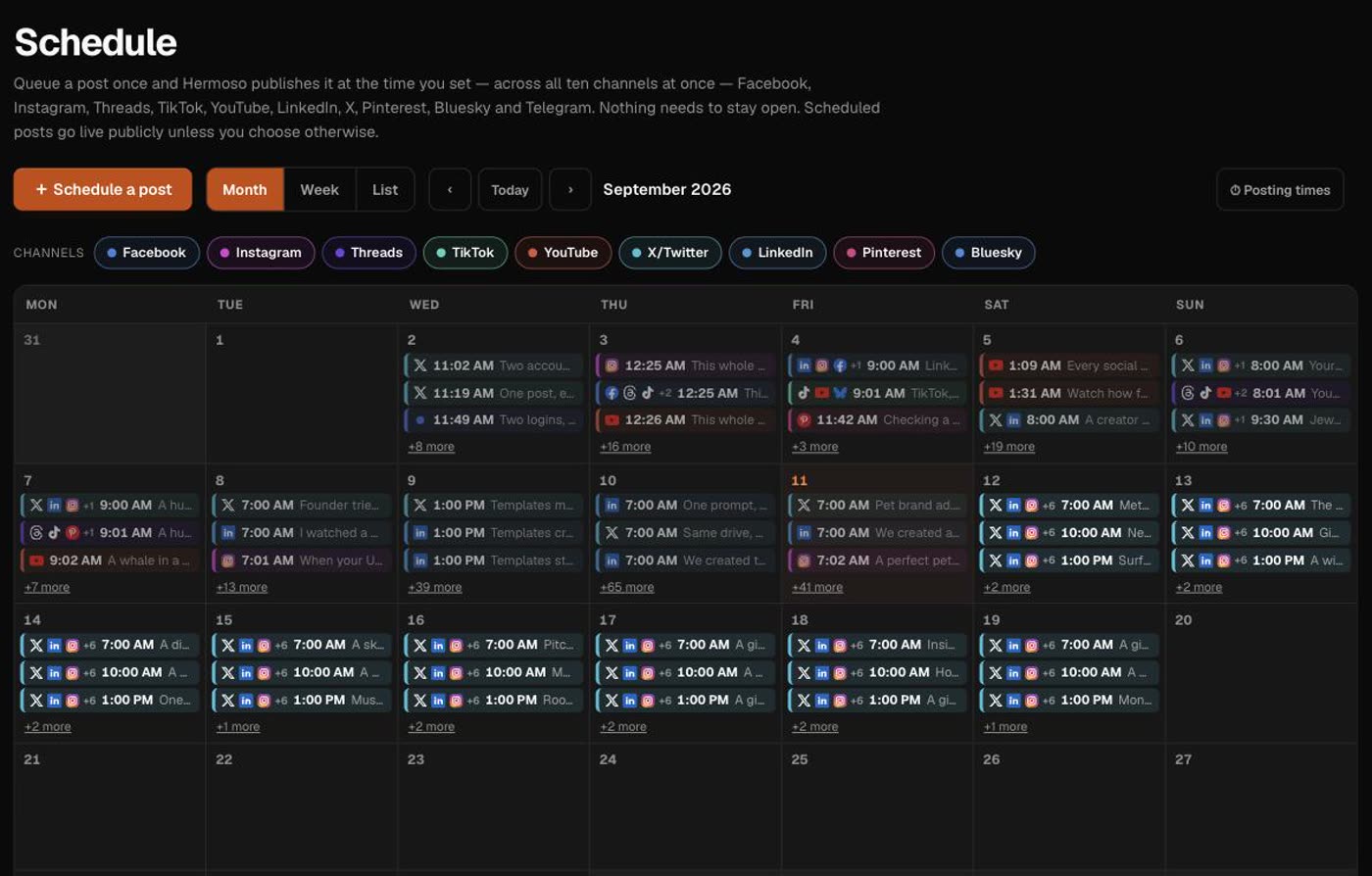
Post to Facebook, Instagram, Threads, TikTok, YouTube, X, LinkedIn, Pinterest, Bluesky and Telegram, right away or on a content calendar. Each client has its own queue on its own accounts, and posts go out on time with nobody logged in. Publishing and scheduling use no credits on any plan, except posting to X. See the social media scheduler.
Run the paid side on 12 ad platforms
Build and manage campaigns, ad groups, ads, budgets and targeting on the client's own ad accounts: Meta, Google Ads, Microsoft Advertising, Reddit Ads, LinkedIn, Pinterest, X Ads, TikTok Ads, Snapchat Ads, ChatGPT Ads, Apple Search Ads and AppLovin Ads. New campaigns are created paused and read back, so a client's budget only starts spending when you switch it on.
Reporting your clients can read
Ask for a client's numbers in plain words: spend and results by campaign on each ad platform, how their posts did by channel over time, and which creative is winning. Hermoso reads them from the client's own ad accounts, channels and analytics, and can write them into a Google Sheet for the monthly report.
Let your own agents do the work
Everything above is also available to AI agents. Connect Claude, ChatGPT, Cursor or any MCP client to the Hermoso MCP server, or use the CLI or the REST API. Your agent can list your client profiles and switch between them, so a prompt like "make three new hooks for each of my ecommerce clients and schedule them for next week" works across your whole roster.
What it costs
Profiles, team seats, publishing, scheduling, campaign management and analytics are included on every plan and use no credits (X posting aside). Credits are used when Hermoso researches or makes something, and the app shows the exact price before every render. Plans differ by monthly credits and per-credit rate, and the Studio plan is aimed at agencies working at volume. See pricing.
Frequently asked questions
Is there a limit on how many client profiles I can add?
No. You can add as many profiles as you have clients, on every plan including Free. Setting up a new profile researches that client's market and drafts the brand, and that research uses credits. Keeping the profile costs nothing.
Can my teammates see every client?
No. A teammate sees only the profiles you share with them. Your account's billing and your other clients stay out of their view.
Who pays for an ad a teammate makes?
The agency account that owns the profile. A teammate's renders use the owner's credits, so you have one balance and one bill.
Can each client have its own Meta, TikTok and Google Ads accounts?
Yes. Connections live on the client's profile, and you tick which pages and ad accounts that profile may use. The Studio and your AI agent can only act on accounts you have ticked, and disconnecting one client leaves the others alone.
Will Hermoso spend a client's ad budget on its own?
No. Campaigns are created paused and read back so you can check them. Nothing spends until you or your agent switches it on.
Can we run it from our own AI agents?
Yes. Connect Claude, ChatGPT, Cursor or any MCP client to the Hermoso MCP server, or use the CLI or the REST API. An agent can list your client profiles and switch between them, so one prompt can work through several clients.
Do you have agency pricing?
Every plan includes unlimited profiles and team seats, and publishing, scheduling, campaign management and analytics use no credits (posting to X is the one exception). Plans differ by monthly credits and per-credit rate, and the Studio plan is built for agencies working at volume. Annual billing saves two months, and custom volume pricing is available by emailing hello@hermoso.ai.
Do I have to use every part of it?
No. Research, creation, publishing, paid campaigns and reporting each work on their own. Some agencies only use the competitor research or only the scheduler, and that works fine.
Add your first client, paste their site, and have their first ads and posts lined up today. Start free, 250+ earnable free credits, no card.
Start free → See pricingLooking mostly at creative? The AI ad creative for agencies page goes deeper on making ads for many brands.