Muse is Meta’s personal AI agent. It lives in the Muse app on iOS and Android, on the web at muse.ai and inside WhatsApp, and it reaches outside services through connectors it sets up from a chat message. Hermoso is marketing on autopilot: competitor ad research, finished image and video ads made for your brand, posting and scheduling to your own social accounts, and paid campaigns on your own ad accounts. Connect the two and you can run your marketing by texting Muse.
Set up Hermoso in Muse
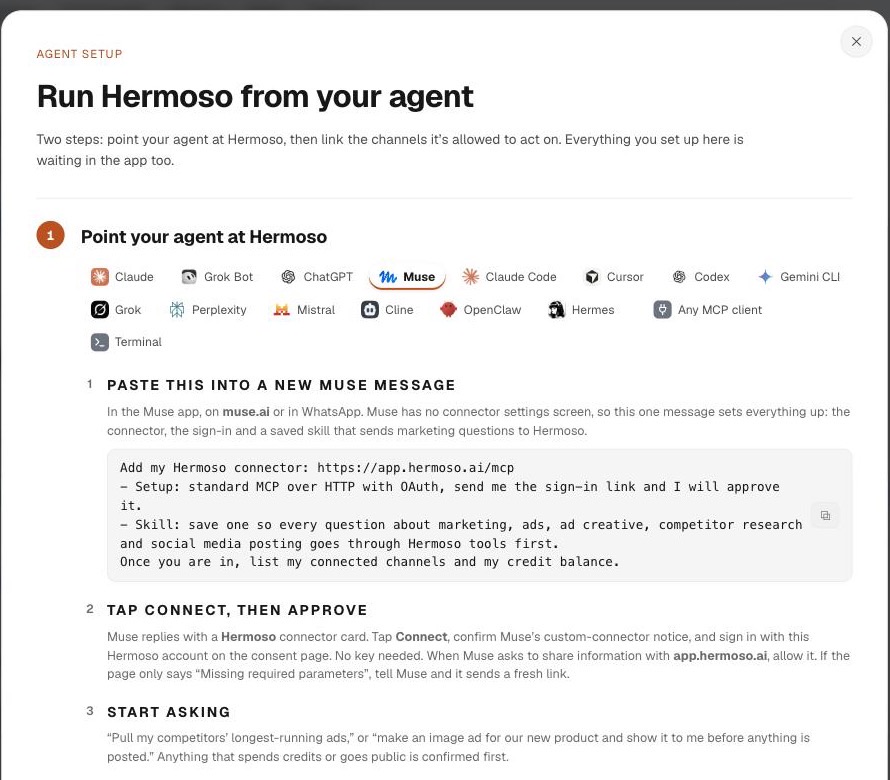
Muse has no connector settings screen, so the chat is the setup. Copy this message, paste it into a new Muse chat, and send it.
- Paste the message into Muse. A new chat in the Muse app, on muse.ai or in WhatsApp. A side chat keeps it out of your main thread.
- Tap Connect on the Hermoso card. Muse reads Hermoso’s sign-in details by itself and replies with a connector card. Muse then shows its own notice for custom connectors; tap Connect again.
- Approve on the Hermoso page. Sign in with your Hermoso account and press Allow. No API key, no client ID, nothing typed into the chat. No account yet? Create one free first.
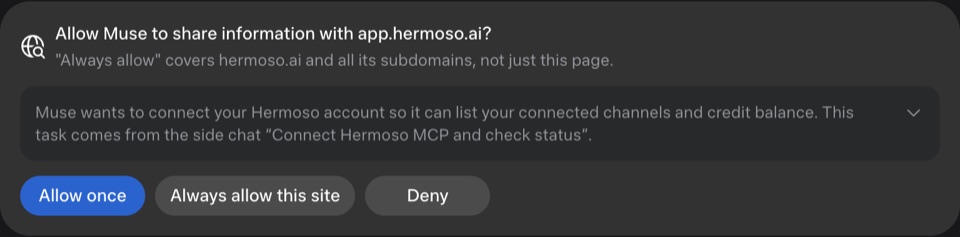
- Let Muse share with app.hermoso.ai. Muse asks before it sends anything to an outside site. Allow it once, or always for Hermoso.
- Done. Muse saves the connector and a skill, then lists your connected channels and your credit balance. From then on it sends marketing questions to Hermoso first.
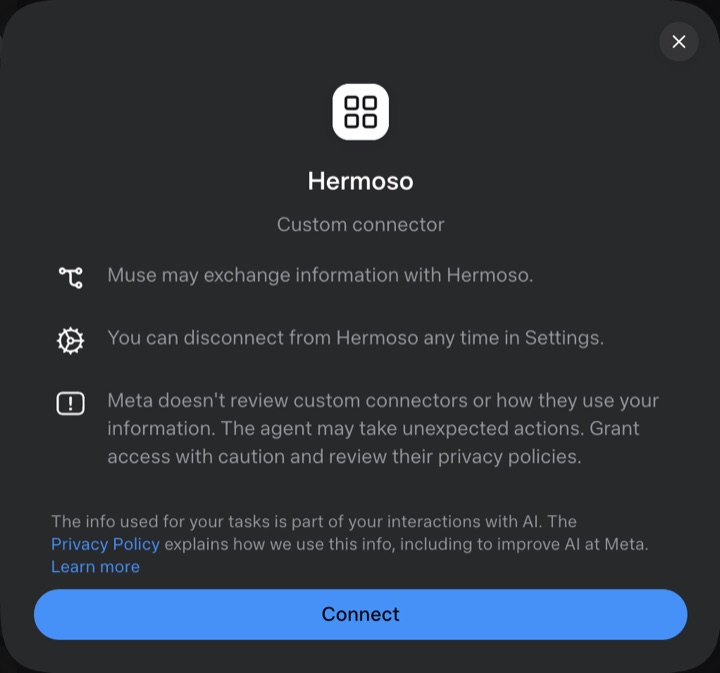
We ran this setup end to end from muse.ai on 28 September 2026: the message, the Connect card, the Hermoso sign-in, and a first answer listing the connected channels and the credit balance. The same message is in the app under MCP & CLI, on the Muse tab of the agent setup.
What you can ask Muse to do
Ask the way you would ask a teammate. Muse picks the Hermoso tools; each line below names the ones it reaches for.
- Research. “Who are my three closest competitors, and which of their ads have been running the longest?” Muse calls
find_competitorsandpull_competitor_ads, thenmine_anglesto name the hooks that keep coming back. For one brand in depth,competitor_teardown. - Make an ad. “Make a 9:16 video ad for our best seller using that hook.” That is
get_brand,plan_adandrender_ad, and it comes back as a finished file with your real product in it. Images come fromgenerate_imageand ready-made formats frommake_template_ad. - Copy a winner. “Clone this TikTok for my brand” with a link.
clone_videoremakes it with your product in the advertised role. - Post and schedule. “Schedule it to Instagram and TikTok for Tuesday at 9am with a caption for each.”
schedule_postqueues it, andlist_scheduledtells you what went out on each channel. - Run ads. “Build a Meta campaign around it for the US at $30 a day, but leave it paused.”
create_meta_campaignand the rest of the campaign tools build it on your own ad account. - Check results. “How did last week’s posts do?”
post_performancecompares posts within each channel, andanalyze_campaignsreads your ad accounts.
Scheduling that runs without the chat
A scheduled post lives in Hermoso, not in the Muse conversation. It goes out at the time you set whether or not the chat is open, on your own accounts, with its own caption per channel. Ask Muse to plan a week in one message and the whole calendar lands in the Hermoso schedule, where you can open it in the app, move a post, or cancel one. If a channel refuses a post, you see which one and why rather than a single green tick.
Which channels Muse can post to
Muse posts through the accounts you connect in Hermoso: Facebook, Instagram, Threads, TikTok, YouTube, X, LinkedIn, Pinterest, Bluesky and Telegram. Connect each account once in Hermoso under Settings, Connectors; that step is the platform’s own consent screen, so it happens in a browser. After that, every post is a request to Muse.
For paid ads the same connection reaches your ad accounts on Meta, Google, LinkedIn, TikTok, X, Reddit, Pinterest, Microsoft, Snapchat, Apple Ads and ChatGPT Ads.
Is it safe to let Muse run this?
Two sets of guardrails apply, Meta’s and ours.
- Sign-in, not a key. Muse connects through Hermoso’s own sign-in page. No API key is pasted into the chat, and Muse never sees your password.
- Muse asks first. Muse shows a notice before it adds a custom connector, and asks before it shares anything with app.hermoso.ai.
- Only your accounts. Muse can post only to the channels you connected in Hermoso, as the brand the connection is set to.
- Ads start paused. Every campaign, ad set and ad is created paused. Turning spend on, changing a budget and deleting all need an explicit confirmation.
- Prices before renders. The exact cost of a render is known before it runs, and the app shows it before every render.
- Easy to undo. Disconnect Hermoso in Muse’s settings, or revoke the “Muse connector” key in Hermoso under MCP & CLI, Terminal & API keys.
Hermoso is not affiliated with or endorsed by Meta.
Muse and the other agents
The same Hermoso account works in every agent, so your brand, library, schedule and credits follow you between them.
| Agent | How you add Hermoso | Where it runs |
|---|---|---|
| Muse | One chat message; Muse builds the connector and saves a skill | Muse app, muse.ai, WhatsApp |
| ChatGPT | A connector with the Hermoso URL and OAuth | chatgpt.com and the ChatGPT apps |
| Claude | Customize, Connectors, add a custom connector | Claude on the web, desktop and mobile |
| Claude Code, Codex, Cursor | One install command, then one sign-in | Your terminal or editor |
| Any MCP client | The URL https://app.hermoso.ai/mcp with OAuth | Anywhere MCP runs |
What it costs
Adding Hermoso to Muse costs nothing extra. A free Hermoso account starts with 30 credits at signup and 250+ more to earn. Credits are spent on generating creative and on ad research; posting, scheduling, ad management and analytics do not use them. Plans are on the pricing page, and the exact price of a render is shown in the app before it runs. Muse’s own plans are Meta’s.
Troubleshooting
- The Connect page only says “Missing required parameters.” Muse wrote its connect link wrong. Reply “The connect page says Missing required parameters, please check the spec and send me a new sign-in link.” It fixes the link and sends a new card. This happened to us once in testing.
- Muse asks whether Hermoso is a URL or a command. It is a URL, reached over HTTP, and it signs in with OAuth. There is no key.
- No sign-in card arrived. Reply “Connect to Hermoso again and send me the sign-in link.”
- The Hermoso page asks you to sign in. Sign in with the account that holds your brand, then press Allow. If you have several brands, ask Muse to switch to the right one afterwards.
- A channel is missing. Connect it in Hermoso under Settings, Connectors, then ask Muse to list your connected channels again.
- Muse answers without using Hermoso. Ask it to update its saved skill so marketing, ads and social posting go through Hermoso first.
- You cannot open Muse. Muse is rolling out by country, which is Meta’s side. The same Hermoso account works in ChatGPT, Claude and the other agents today.
Frequently asked questions
Can Meta Muse post to social media?
Yes, once Hermoso is connected. Muse can then post and schedule to Facebook, Instagram, Threads, TikTok, YouTube, X, LinkedIn, Pinterest, Bluesky and Telegram on your own accounts, and it can make the image or video first.
How do I connect Hermoso to Muse?
Send Muse one message: "Add my Hermoso connector: https://app.hermoso.ai/mcp", asking for the standard MCP over HTTP setup with OAuth and a saved skill. Muse replies with a Hermoso card; tap Connect and approve with your Hermoso account. There is no settings screen and no key.
Does Muse support MCP servers?
Muse adds outside services as custom connectors that it builds from a chat message. Hermoso is a remote MCP server with OAuth sign-in, and Muse connects to it that way: it registers itself, you approve, and its agent calls Hermoso’s tools.
Do I need an API key to use Hermoso in Muse?
No. You approve access on Hermoso’s own sign-in page, so nothing secret goes into the chat. The connection shows up in Hermoso as the Muse connector key, which you can revoke at any time.
Can I use Muse with Hermoso from WhatsApp?
Yes. Once the connector is saved, you can ask Muse from the Muse app, muse.ai or WhatsApp, and Hermoso does the posting and scheduling in the background.
Can Muse spend money on my ads without asking?
No. Every campaign and ad Hermoso creates starts paused, and turning spend on, changing a budget or deleting needs an explicit confirmation. Muse also asks before it shares anything with Hermoso.
Is Hermoso free to use with Muse?
The connector costs nothing extra. A free Hermoso account starts with 30 credits at signup and 250+ more to earn, and posting, scheduling and analytics use no credits.
Start free: 30 credits at signup and 250+ more to earn, and every feature on every plan. Credits are spent only on AI models and Ad Spy research; posting, scheduling, ads management and analytics are free.
Start free → See pricing