Instagram Ads Library: how to see any brand's Instagram ads (2026 guide)
There is no separate Instagram ad library. Instagram ads are in the Meta Ad Library: how to filter it to Instagram, what it shows, what it hides, and how to spot the ads that work.



Made with Hermoso
There is no separate Instagram ad library. Instagram ads are in the Meta Ad Library at facebook.com/ads/library, the same free archive that holds Facebook, Messenger and Threads ads. Pick a country, search a brand or a keyword, then set the Platform filter to Instagram. You see every Instagram ad the brand is running, with the date each one started. It is free, and you do not need an Instagram or Facebook account.
This guide shows the exact clicks, what the library tells you and what it leaves out, and how to pick out the Instagram ads that are actually working.
- Instagram ads live in the Meta Ad Library: facebook.com/ads/library. No login needed.
- Search a brand’s page or a keyword, then filter Platform to Instagram and Media type to video or image.
- You get every active ad and its start date. You do not get spend, reach or results for ordinary ads.
- An ad that has run for weeks or months is one the brand keeps paying for. That is your winner signal.
See a brand’s Instagram ads now
Hermoso finds the brand’s page and lists its Facebook and Instagram ads, longest running first, with the days each one has been live.
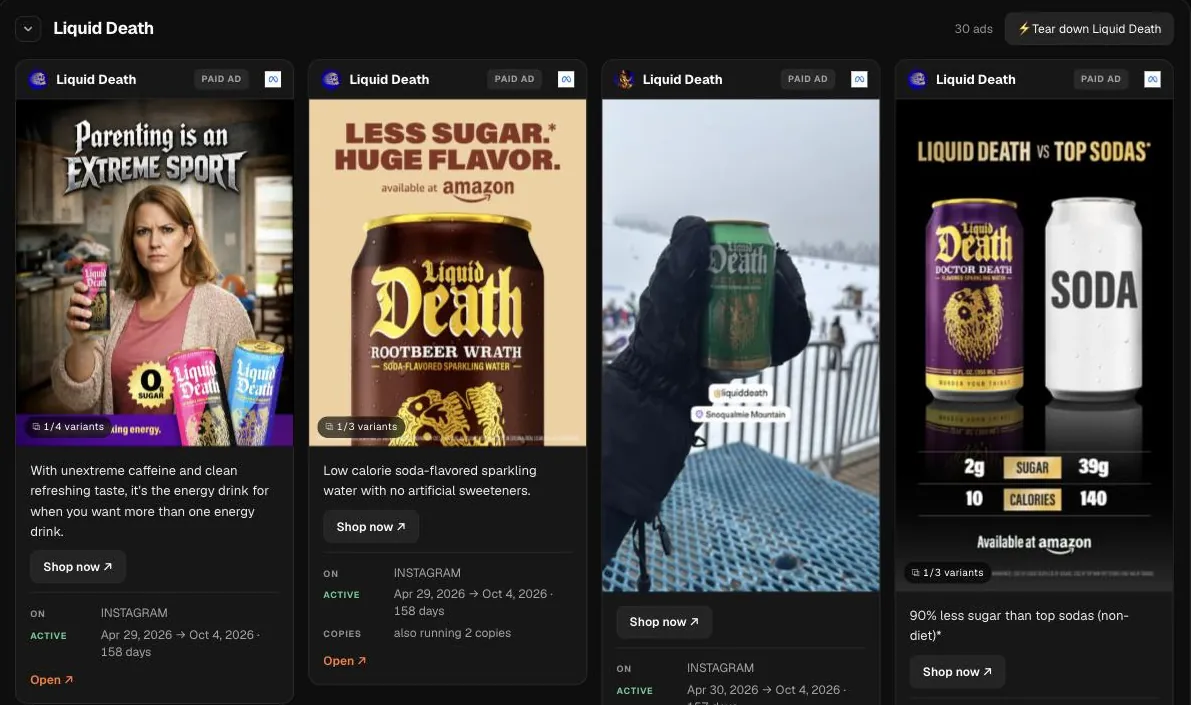
How to see a brand’s Instagram ads, step by step
- Open the Meta Ad Library at facebook.com/ads/library.
- Pick a country. Choose the market you care about. A brand’s US ads and its UK ads are often different creative.
- Leave the category on “All ads” unless you are researching political, housing, employment or credit ads.
- Search the brand. Type its name and pick its page from the suggestions. To find every advertiser using a phrase instead, search a keyword, in quotation marks for an exact match.
- Filter to Instagram. Open Filters and set Platform to Instagram. Add Media type (image or video) if you only want one format.
- Read the start dates. Each ad card says when it started running. Open an ad to see the full creative, the copy and where the button goes.
The Meta library has more filters than these, and a few reading tricks. The Meta Ad Library guide covers all of them.
What you can see, and what you cannot
- You can see every active ad, its images or video, its copy and button, the date it started, and the Meta platforms it runs on.
- You cannot see spend, impressions, clicks or sales for ordinary commercial ads. Meta publishes spend and reach only for ads about social issues, elections or politics.
- How long ads stay: most ads leave the library when they stop running. Political and social-issue ads stay for seven years, and ads delivered in the EU stay for a year after their last impression.
- Creator posts: a creator’s post with a paid partnership label is branded content. The Ad Library has a separate branded content search for those, so check it too for a brand that works mostly with creators.
How to tell which Instagram ads are working
The library has no “best ads” sort, so you read it yourself. The most reliable free signal is run length. Brands switch off ads that lose money, usually within days. An Instagram ad that has been live for two months has survived eight weeks of someone checking the numbers and choosing to keep paying. One that started last week is a test.
- Sort by age with your eyes. Scroll to the oldest active ads first. Those are the proven ones.
- Look for the same ad in many versions. When a brand runs one idea with five different hooks, the idea is working and they are testing the opening.
- Note the format. If a brand’s long-runners on Instagram are almost all short vertical video, that tells you what Instagram is rewarding for that audience.
We wrote up why run length works in a separate post.
From research to your own Instagram ad
Finding the ad is half the job. The other half is making your own version, which means keeping the structure (the hook, the order of the beats, the offer) and replacing everything that is theirs with your product, your words and your brand.
- Hermoso’s ad spy tool pulls a competitor’s Meta ads and ranks them by how long each has run, so the proven ones come first.
- Clone a video ad remakes a winning Reel or ad around your product from its link.
- The AI Instagram ad generator makes a new image or video ad from your website, in square, vertical or any size.
- Schedule it on Instagram, or run it as a paid campaign with the Meta Ads tools, where every new campaign starts paused until you say go.
The other ad library guides
- Meta Ad Library: Facebook, Instagram, Messenger and Threads
- Google Ads Transparency Center: Search, YouTube, Shopping, Maps and Play
- TikTok Ads Library and Creative Center
- LinkedIn Ad Library
- TikTok Creative Center and Top Ads
- Pinterest Ads Library (the Ads Repository)
- Snapchat Ads Library (the Snap Ads Gallery)
- Reddit Ads Library
- Why run length is the best free signal of a winning ad
Start free in Hermoso, no card.
Questions people ask
Is there an Instagram ad library?
Not a separate one. Instagram ads are in the Meta Ad Library at facebook.com/ads/library, which also covers Facebook, Messenger and Threads. Filter Platform to Instagram to see only Instagram ads.
How do I see a competitor's Instagram ads?
Open facebook.com/ads/library, pick a country, search the competitor's page, then set Platform to Instagram. Every active ad shows with the date it started.
Do I need an Instagram or Facebook account to use it?
No. The Meta Ad Library is public and free, and you can search it without logging in.
Can I see how much a brand spends on Instagram ads?
No, not for ordinary ads. Meta shows spend and reach only for ads about social issues, elections or politics. For other ads, how long an ad has run is the best free hint that it works.
Can I see a brand's old Instagram ads?
Mostly not. Ordinary ads leave the library when they stop running. Ads delivered in the EU stay for a year, and political and social-issue ads for seven years.
Why can I not find a creator's sponsored post?
A creator post with a paid partnership label is branded content. The Meta Ad Library has a separate branded content search for those posts.