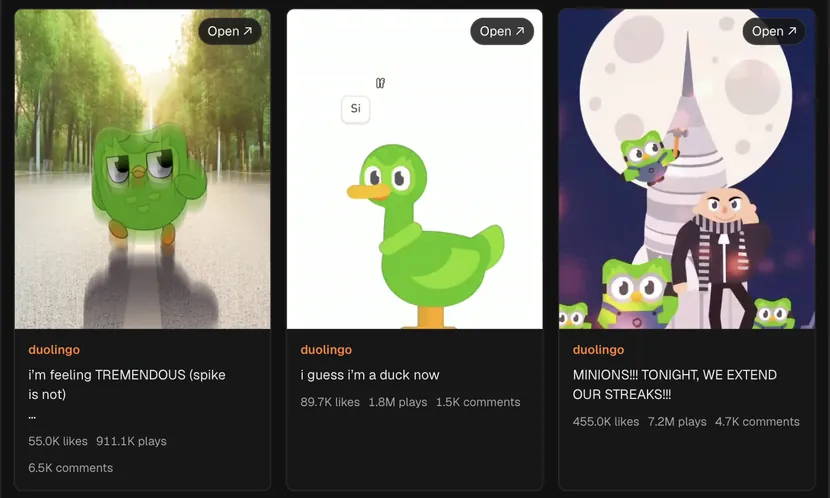
What the viewer pulls
Type a username such as @duolingo, or paste a link to the profile, and search. Hermoso reads the account's recent Reels and lays them out as cards: the cover, the caption, the plays, the likes and the comment count. Each Reel plays in place, and Open takes you to the Reel itself.
Reels the account made with another brand as a collaborator can show up too, so a sports or gaming partnership often sits right next to the brand's own videos. That is useful on its own, because collab Reels tend to travel further than solo ones.
Ways marketers use it
- Finding the format that carries an account. Most brands have one or two Reel formats that pull far more plays than the rest. Line up the last dozen and the pattern is usually obvious within a minute.
- Briefing a creator. Send a creator the three Reels from a brand you admire with the most plays, instead of a paragraph about tone. They will get it faster.
- Checking a competitor's push. A sudden run of Reels about one product or one offer tells you what they are betting on this month.
How to read plays, likes and comments
Plays tell you how far a Reel travelled, likes tell you whether people enjoyed it, and comments tell you whether it gave them something to say. Compare each Reel with the same account's other Reels, not with a bigger brand. A Reel with double the account's usual plays is the one to study, even if its totals look small.
Then look at the first second. Pause each strong Reel on its opening frame and write down what you see: a face, a caption, a product, a question. Those openers are the part most worth borrowing.
Limits to know
The viewer reads what Instagram shows publicly right now. Private accounts cannot be viewed, deleted Reels are gone, and the lookup covers recent Reels rather than an account's full history. Photo posts and carousels are not part of this view; for posts about a topic across many accounts, use Instagram Reels search or the Instagram hashtag search.
When a Reel gives you an idea, press "Ask the Studio about this" under the results and ask it to write or make one like it for your brand, or take the idea to the AI ad generator to make it as an ad. To post Reels from Hermoso, see Hermoso for Instagram and the Instagram scheduler.
Frequently asked questions
What does the Instagram Reels viewer cost?
It needs a free Hermoso account. Each search uses a small amount of credits, and new accounts start with free credits, so your first searches are covered. Hermoso then reads the public data and shows the results in a results view in the app.
Can I watch the Reels without opening Instagram?
Yes. Each Reel plays inside the results, and Open goes to the Reel on Instagram if you want the comments.
Does it work on private accounts?
No. Only accounts that show their Reels publicly can be viewed.
Why do I see Reels from another account?
Those are collab Reels: the brand you searched is a collaborator on them, so Instagram lists them on both profiles.
Can I paste a profile link instead of a username?
Yes. A link to the profile works the same as @username.
What can I do with a Reel I like?
Press "Ask the Studio about this" under the results and ask it to turn it into an idea, a script or a Reel for your own brand.
Found a post that is working? Paste its link into Hermoso and it makes your version of it for your own brand, with your product and your voice, ready to post. New accounts start with free credits.
Remake a post for your brand → See pricing