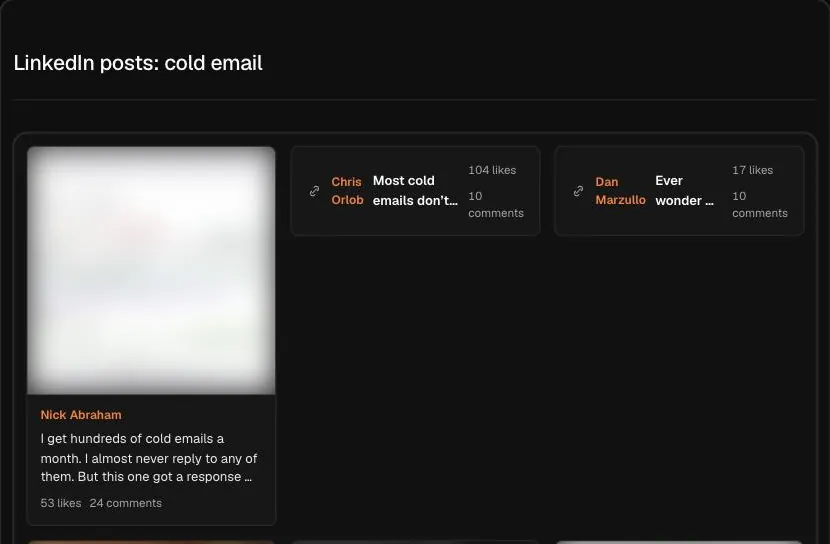
What the search finds
Type a topic like "cold email" or "product-led growth" and click search. The Hermoso Studio searches LinkedIn for public posts about it and shows them in the chat, leading with the ones with the most engagement. The results come from founders, sales leaders, recruiters, consultants and company pages alike, so you see the whole conversation on a topic, not just one brand's view of it.
You get posts only, in one list, and you can ask the Studio what the strongest ones have in common, who wrote them, and which angles keep coming up.
How marketers and founders use it
- Find the takes that already work. Before writing a post on a topic, see which posts on it drew the most engagement. You will spot the angles that are tired and the ones people still respond to.
- Find people worth knowing. The authors of the top posts on your topic are often the voices your buyers already follow. They are good candidates for partnerships, podcasts or a sponsored post.
- Collect hooks for B2B ads. A first line that pulled strong engagement in the feed is a tested hook. Ask the Studio to rewrite it as a LinkedIn ad intro for your product.
- Read objections before a campaign. Search the category you sell into. Posts that complain about how things are done today show the objections your ads need to answer.
How to read the results
Engagement on LinkedIn is shaped by who posts. A well-known founder gets attention on almost anything, so a strong post from an unknown author can tell you more about the idea itself. Look at the format too. LinkedIn posts often win with a short first line, white space, and a list or a story. Ask the Studio to pull out the opening lines of the top posts and you have a swipe file of hooks in one answer.
Broad words like "hiring" return busy, general results. Specific phrases like "outbound for seed stage startups" return posts from people who know the subject. Try both and compare.
Limits
The Studio only sees posts that LinkedIn shows publicly right now. Posts shared only with connections, posts in private groups and deleted posts cannot be read. The search has no filters for date, industry, location or author title, and it does not show impressions or how a topic has trended over time. Treat it as a quick look at what is resonating, not a complete record of every post on the subject.
When a post gives you an idea, ask the Studio to turn it into a LinkedIn post or ad for your brand in the same chat. To publish on LinkedIn from Hermoso, see Hermoso for LinkedIn and the LinkedIn scheduler.
Frequently asked questions
Is LinkedIn post search free?
Yes. Type a keyword or topic and search for free. The Studio shows the LinkedIn posts about it with the most engagement first.
Do I need a LinkedIn login?
No. You type the topic here and the Studio reads the public posts for you. You never log in to LinkedIn.
Whose posts does it include?
Any public LinkedIn post about the topic, from people and company pages alike. Posts shared only with connections are not public, so they are not included.
Can I filter by date, industry or job title?
No. The search returns public posts about the topic, led by the most engaged ones, with no extra filters. You can ask the Studio to point out patterns in the results.
Does it show impressions?
No. LinkedIn only shows impressions to the post's author. The search ranks posts by the engagement LinkedIn shows publicly right now.
Can Hermoso write a post from what I find?
Yes. Ask the Studio in the same chat to write a LinkedIn post or ad for your brand that takes the angle of a post that did well.
Hermoso turns what you find into finished ads and posts for your own brand, then runs your marketing on autopilot. Start free, 250+ earnable free credits, no card.
Start free → See pricing