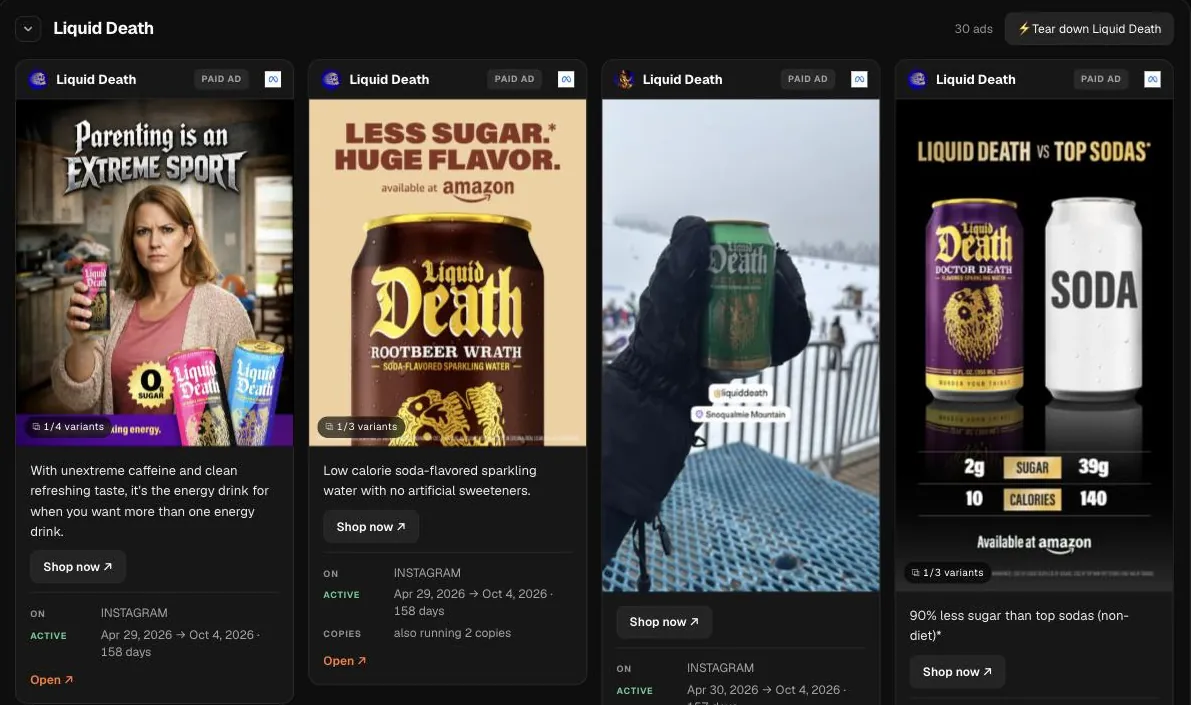
Meta Ad Library search in three steps
- Type a brand name or its website in the box at the top of this page, like Oatly or glossier.com.
- Press Search. Hermoso finds the brand’s Facebook page and lists the ads Meta discloses for it, longest running first, with the creative, the copy, the platforms and the days each has run.
- Open an ad you like, or ask the Studio to turn its angle into an ad for your own brand.
What this search shows
Hermoso matches your search to the brand's Facebook page and reads the ads Meta publicly discloses for it. One brand on Meta reaches several places at once: Facebook, Instagram, Messenger, Threads and the Audience Network apps. Each result card carries the creative, the ad copy, the call to action button, the platforms the ad was booked on, its start date and the number of days it has been running.
The order matters more than anything else on the page. Results come back longest running first, because Meta shares no spend or results for ordinary commercial ads. Run length is the public signal left over: an ad that loses money gets paused within days, so one still live after a quarter is one the brand keeps choosing to fund. We explain the reasoning, and its exceptions, in why run length works as a winner signal.
Ways marketers use it
- Before a creative sprint. Search the three brands you lose customers to and read only the top ten cards of each. Those are the concepts you are up against in the feed this month.
- Checking a format bet. Thinking of moving budget into video or carousels? See whether the long runners in your category are video, static or carousel before you brief anything.
- Spotting offer patterns. Read the button and the first line of copy across the long runners. "Shop now" with a discount in line one tells a different story from "Learn more" pointing at a quiz.
- Placement clues. The platform list shows whether a brand books its best ads everywhere or keeps some on Instagram only. That hints at where its buyers spend their time.
How to read the results
- Start at the top and stop early. The first handful of cards hold the ads with the most proof behind them. Anything a few days old near the bottom is a test, and the brand does not know yet whether it works.
- Look for repeats. When the same caption runs with different images, the brand is testing visuals against a line it already trusts. The line is the part worth writing down.
- Read the copy as a structure. Hook, proof, offer, button. Note the structure rather than the words, so your version ends up your own.
- Act on it. Keep the cards you like in a swipe file, or Clone one to remake it with your product, colours and voice.
From the same results, one click adds suggested competitors, and Ad Spy can bring in the same brand's ads from other libraries so you compare them side by side.
What it cannot tell you
There is no spend, reach or conversion data for regular brand ads. Meta only discloses those numbers for political and social issue ads, plus some reach figures for ads delivered in the EU. A long run is strong evidence, not proof: some awareness ads run for months on a fixed budget, and very large advertisers sometimes leave evergreen ads up out of habit.
Names can also collide. If a brand shares its name with another page, a common word or a person, search its website instead, like oatly.com. Hermoso uses the Instagram account the site links to as the tiebreaker, and when a name stays ambiguous it tells you so rather than showing you a different company's ads.
Go deeper
For the filters, the run-length signal and a full competitor workflow, read how to use the Meta Ad Library to find winning ads. When you find an ad worth learning from, the AI ad generator makes a version of it for your own brand, and an AI marketing agent like Hermoso can run it as a campaign on Meta for you. To watch the same brands on Meta, Google and LinkedIn at once and get each new ad the week it starts, see the ad spy tool. The same search for other libraries: Google Ads Transparency search and LinkedIn Ad Library search.
Frequently asked questions
What is the Meta Ad Library?
It is Meta’s public archive of the ads running across Facebook, Instagram, Messenger, Threads and the Audience Network. Every active ad from every advertiser is in it, and ads about social issues, elections or politics, and ads delivered in the EU, are kept with extra detail. This page searches it for you by brand or website and puts the longest-running ads first.
Is this an ad spy tool?
For Meta ads, yes: type a competitor and see every ad they are running, ranked by how long each has run. Hermoso’s Ad Spy does the same across Meta, Google and LinkedIn and can watch a list of competitors for you every week.
How do I search the Meta Ad Library for a competitor?
Type the competitor's brand name or website in the box on this page and press Search. Hermoso matches it to the brand's Facebook page and lists the ads Meta discloses for it, longest running first, covering Facebook, Instagram, Messenger, Threads and the Audience Network.
What does the Meta Ad Library search cost?
It needs a free Hermoso account. Each search uses a small amount of credits, and new accounts start with free credits, so your first searches are covered. Hermoso then reads the public data and shows the results in the chat.
Which platforms are included?
Every Meta placement the brand books: Facebook, Instagram, Messenger, Threads and the Audience Network. Each card lists the platforms that particular ad ran on.
Why longest running first instead of newest?
Because run length is the best public sign that an ad works. Brands switch off ads that lose money quickly, so an ad still live after months is one they keep paying for.
Can I see how much a competitor spends on Meta?
No. Meta does not disclose spend or results for ordinary commercial ads, only for political and social issue ads. Run length is the signal you get instead.
What if I get the wrong brand?
Search the brand's website instead of its name. Hermoso uses the Instagram account linked from that site to pick the right Facebook page, and says so when a name is still ambiguous.
What can I do with an ad I like?
Save it to your swipe file to build a reference board, or Clone it to remake the ad for your own brand with your product, colours and copy.
Put the brands you compete with on a weekly watch, see each new ad the week it starts running, and turn the ones that keep running into ads for your own brand. New accounts start with free credits.
Watch a competitor's ads → See pricing