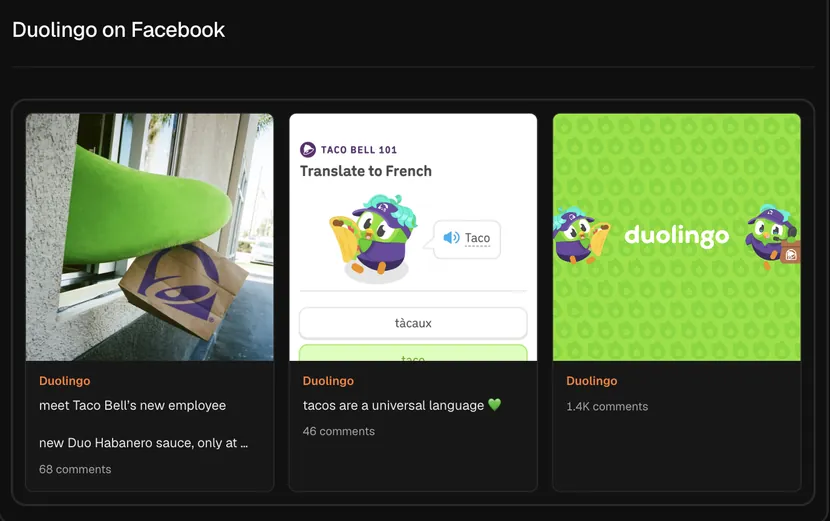
What the viewer pulls
Type a page name such as duolingo, or paste the page's facebook.com link, and search. Hermoso reads the page's most recent public posts and shows each one as a card with its image, its text and how many comments it drew. Open goes to the post on Facebook.
This is the page's organic feed: what the brand posts to its followers. The ads a brand pays to run are a different thing, and you can see those with the Meta Ad Library search.
Ways marketers use it
- Comparing the feed with the ads. Look up a brand's page here and its ads in the Meta Ad Library search. When a post and an ad share an image or a line, the brand has usually tested that idea organically first.
- Reading a local competitor. For restaurants, gyms, salons and shops, the Facebook page is often the most active channel they have. Their last few posts show the offers and events they are pushing right now.
- Finding what gets people talking. Comments are the clearest signal a Facebook post landed. The posts with the most comments are the ones to read closely.
How to read the posts
Look at the comment count against the page's other recent posts, not against bigger pages. A post with ten times the page's usual comments usually asked a question, ran a giveaway or said something people disagreed with. Read the text to see which.
Then look at the picture. Pages that post photos of real customers, staff or products usually get more comments than pages that post designed graphics, and the cards make that easy to see at a glance.
Limits to know
The viewer reads public Facebook pages. Personal profiles, private groups and posts limited to friends cannot be viewed. It shows the page's latest posts rather than its whole history, and it does not track follower counts over time.
Hermoso is an AI marketing agent, so it can write and schedule posts for your own Facebook page too. To set that up, see Hermoso for Facebook and Instagram and the Facebook scheduler.
Frequently asked questions
What does the Facebook page viewer cost?
It needs a free Hermoso account. Each search uses a small amount of credits, and new accounts start with free credits, so your first searches are covered. Hermoso then reads the public data and shows the results in a results view in the app.
Do I need a Facebook account?
No. You type the page here and Hermoso reads its public posts for you.
Can I view a personal profile or a group?
No. It reads public Facebook pages only: brands, businesses, creators and organisations.
What do I type if the page has an odd address?
Paste the page's full facebook.com link. That always works, even for pages whose address is a number.
Does it show the page's ads?
No, this shows the page's own posts. For the ads a brand runs on Facebook and Instagram, use the Meta Ad Library search.
What can I do with a post I like?
Press "Ask the Studio about this" under the results and ask it to write a post or an ad for your brand based on it.
Found a post that is working? Paste its link into Hermoso and it makes your version of it for your own brand, with your product and your voice, ready to post. New accounts start with free credits.
Remake a post for your brand → See pricing