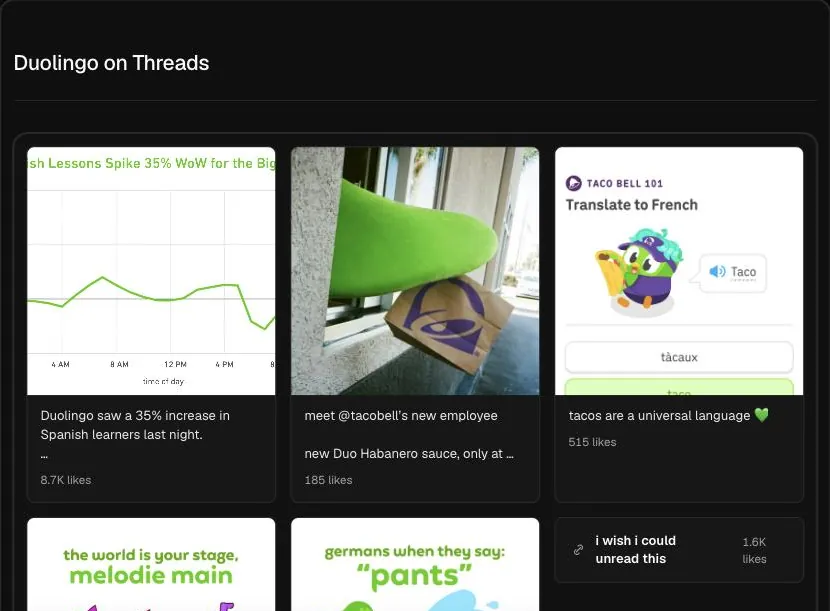
What the viewer pulls
Enter a username such as @glossier and click search. The Hermoso Studio reads that profile's recent Threads posts and lays them out in the chat with the likes and replies each one got. Replies matter on Threads more than almost anywhere else, because the feed favours posts that start a conversation, so seeing both numbers side by side tells you more than likes alone.
Once the posts are in front of you, ask the Studio about them. Which posts got more replies than likes? Which were questions? Which ones were reposted from Instagram, and did they do better or worse than posts written for Threads?
Who this helps and how
- Social managers planning a Threads presence. Look up two or three brands in your space. Their recent posts show what tone they settled on after months of testing, which saves you the same months.
- Brands cross-posting from Instagram. Many accounts paste their Instagram captions onto Threads. Compare those posts with the ones written for Threads and you will usually see which approach earns replies.
- Anyone sizing up a creator. Before you pay for a mention, check that people actually reply to this person today, not just that they once gathered a large following.
How to read likes and replies
A post with many likes and few replies was enjoyed but did not invite a response. A post with fewer likes and a long reply count started a discussion, which is often the better sign on Threads. Judge each post against the same account's other recent posts. One post with three times the usual replies is worth studying, even if its totals look small next to a bigger brand.
Pay attention to the first line of each strong post. On Threads the opening sentence decides whether someone stops. Ask the Studio to list the openers of the five best posts and you will have a set of patterns to try.
Also note how often the account posts. A brand that posts several times a day and one that posts twice a week will show very different spreads of likes and replies, so read each post in the rhythm of the account that made it before you copy its schedule.
Limits to know
The Studio reads what Threads shows publicly right now. Private profiles cannot be viewed, deleted posts are gone, and the lookup covers recent posts rather than an account's whole archive. It does not chart follower counts or show how an account changed over time. If a username returns nothing, check the spelling, since Threads handles match the person's Instagram username.
When a post here sparks an idea, ask the Studio to write a Threads post or an ad for your brand from it in the same chat. To post on Threads yourself from Hermoso, see Hermoso for Threads and the Threads scheduler.
Frequently asked questions
Is the Threads profile viewer free?
Yes. Type a username and search for free. The Studio shows the account's recent Threads posts with likes and replies.
Do I need the Threads app?
No. You type the username here and the Studio reads the public profile for you. You do not need to install or log in to Threads.
Can I view a private Threads profile?
No. Private profiles only share posts with approved followers. The Studio can only read posts that Threads shows publicly right now.
Does it show reposts and quote posts?
The Studio shows the recent posts the profile displays publicly, with likes and replies. Ask it in the chat to point out any posts that quote or repost someone else.
Can I see how an account grew?
No. The viewer shows recent posts and their current likes and replies. It does not track follower counts or numbers from earlier dates.
What do I do with what I find?
Ask follow-up questions in the same chat, or ask the Studio to write a Threads post or an ad for your brand based on the posts that did best.
Hermoso turns what you find into finished ads and posts for your own brand, then runs your marketing on autopilot. Start free, 250+ earnable free credits, no card.
Start free → See pricing