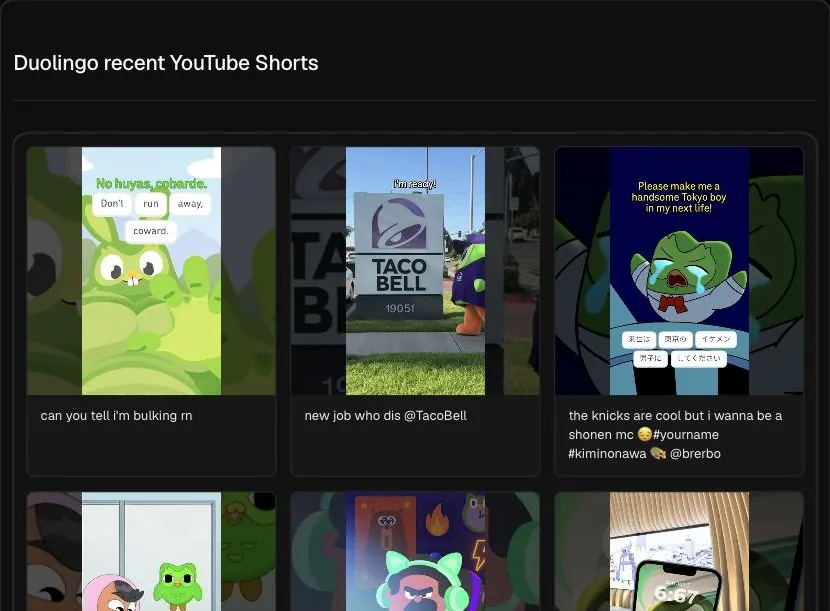
What the Shorts viewer shows
Type a channel handle like @duolingo or paste a channel link, and the Hermoso Studio reads that channel's recent Shorts. Each Short comes back with its view count, and the Studio points out which ones did best. Long videos are left out, so you see the channel's short-form work on its own instead of mixed in with everything else it uploads.
You can follow up right away. Ask the Studio to compare the top Shorts with the rest, to explain the gap, or to suggest how a similar Short could work for your product.
Ways marketers use it
- See how a brand runs Shorts next to its main channel. Many brands treat Shorts as a separate show. This view shows how that show is doing right now.
- Compare a channel across platforms. Look the brand up on TikTok too. The same brand often posts the same clip in both places, and the view counts rarely match. That tells you where its audience actually watches.
- Find a format that travels. A Short that beat its channel's usual numbers is a format worth testing, whether you post organically or cut it into an ad.
- Size up a creator for a partnership. Recent Shorts views show current reach, which a subscriber count gathered over years cannot.
How to read the results
Shorts views swing a lot. One Short can reach far beyond a channel's subscribers while the next stays small, so a single big number says less than a pattern. Look for two or three Shorts clearly above the channel's typical range, then ask the Studio what those have in common.
It also pays to look at the gaps. If a channel posts Shorts every day and only a few rise above the rest, the rest are the cost of finding those few. That is a useful reminder when you plan how many Shorts of your own to test.
Give the newest Shorts time. A Short posted in the last day or two may still be picking up views, so do not count it as a miss yet. If you want to know exactly what a top Short says, paste its link into the YouTube transcript lookup for the full script and a breakdown of its hook.
Good to know
- It reads recent Shorts, not the channel's whole catalogue.
- Numbers are the public view counts YouTube shows right now. Watch time, retention and audience data are private to the channel owner in YouTube Studio.
- Private Shorts never appear.
- Views on a Short count differently from views on a long video, so compare Shorts with Shorts rather than with the channel's long uploads.
- Channel handles start with @. If a handle is ambiguous, paste the channel link instead.
Posting Shorts of your own? The free YouTube title checker shows how your title will look before you publish.
Frequently asked questions
Is the YouTube Shorts viewer free?
Yes. Type a channel handle or link and see its recent Shorts for free, with views and the best performers called out.
Does it include long videos?
No. It reads the channel's recent Shorts only, so short-form results are not mixed in with long uploads.
Can I see a channel's watch time or retention?
No. Those numbers are private to the channel owner. The viewer shows each Short's public view count.
How many Shorts does it read?
The channel's recent Shorts, not its full history. The exact number depends on how often the channel posts.
Can I use a channel link instead of a handle?
Yes. Paste a link like youtube.com/@notion, or type the handle @notion.
Can I get what a Short actually says?
Yes. Paste the Short's link into the YouTube transcript lookup to get its transcript and a summary of its hook, structure and call to action.
Hermoso turns what you find into finished ads and posts for your own brand, then runs your marketing on autopilot. Start free, 250+ earnable free credits, no card.
Start free → See pricing