Claude and ChatGPT connectors for marketing: connect every account once
Connect Meta, Google, TikTok, LinkedIn, X, Pinterest, Stripe, HubSpot and the rest to Hermoso once. Then Claude, ChatGPT, Cursor, Codex and your whole team use all of them through one connector.
Here's a fun bit of maths. Say you use three AI tools: Claude for thinking, ChatGPT on your phone, Cursor when you're building. And say your marketing lives on six platforms: Meta, Google Ads, TikTok, LinkedIn, Stripe and HubSpot. To give every agent access to every account, that's eighteen connections. Each one is its own sign-in, its own API key in its own config file, its own expiry date. Now add two teammates who want the same setup. Fifty-four.
Hermoso turns that into one connection per agent. You connect your accounts to Hermoso once, in the app. Then you add Hermoso as a connector in Claude, ChatGPT or wherever you work, and that agent can read and act on all of them. So can your teammates' agents. (New here? Hermoso is an AI marketing agent: it finds the ads winning in your market, makes your ads and posts, publishes them and runs your campaigns.)
What you can connect
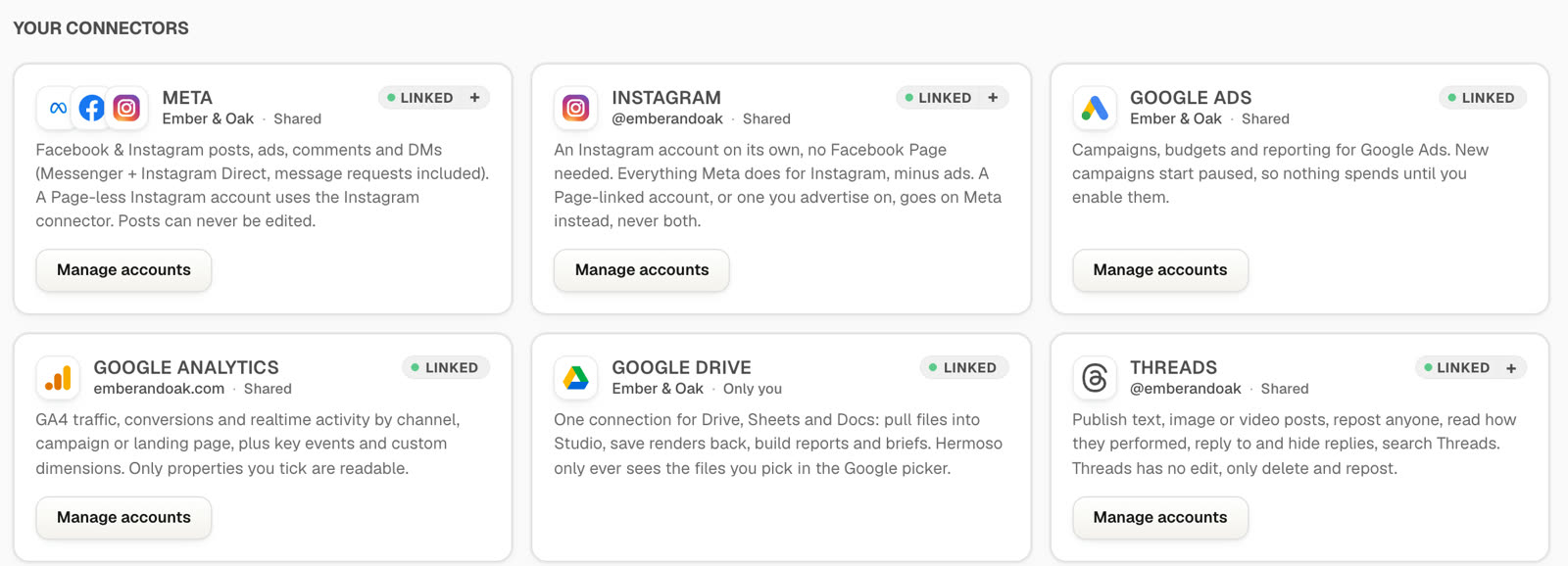
Everything below connects from the Connectors page in the Hermoso app. Most are a normal "Sign in with..." button; a few (Stripe, Telegram, Bluesky, the analytics tools) take a key you paste once.
- Meta: Facebook Pages, Instagram, Threads, WhatsApp, Messenger and your Meta ad accounts.
- Google: Google Ads, Google Analytics, Search Console, Tag Manager, YouTube, and Drive with Sheets and Docs.
- Social: TikTok, LinkedIn (your company Pages and your own profile), X, Pinterest, Bluesky and Telegram.
- More ad platforms: TikTok Ads, LinkedIn Ads, X Ads, Pinterest Ads, Snapchat Ads, Reddit Ads, Microsoft Advertising, Apple Ads, ChatGPT Ads and AppLovin.
- Revenue, CRM and sites: Stripe, HubSpot, Intercom, Vercel, PostHog, Mixpanel, Amplitude, Bing Webmaster Tools and OneDrive.
- Pings: Slack and Discord, so you hear when a render finishes.
The full list, with what each connection can do, is on the channels page.
Set it up in about five minutes
1. Connect your accounts in Hermoso
Sign in at app.hermoso.ai, open Connectors and click through the platforms you use. Each one opens that platform's own sign-in, so you approve exactly what Hermoso can do there.
Then press Manage accounts on any card that holds more than one account. If you run five Facebook Pages and three ad accounts, tick the ones this brand should use. Only ticked accounts are usable, the server checks every call against that list, and an empty list shares nothing. Your agent can't post to the wrong Page because it was never given that Page.
2. Add Hermoso to your AI
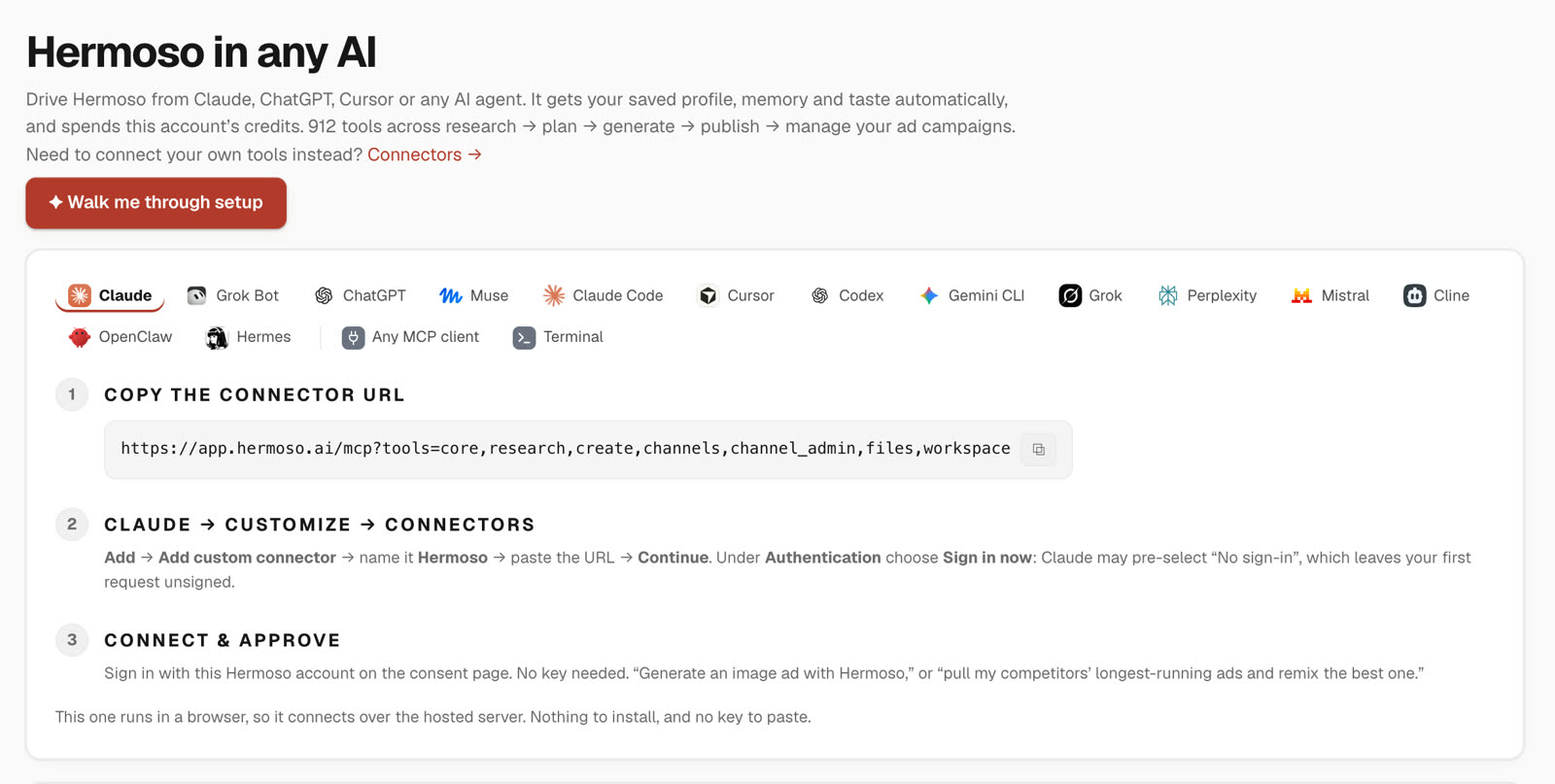
The connector address is the same everywhere: https://app.hermoso.ai/mcp.
- Claude (web, desktop and Cowork): Customize, then Connectors, then Add custom connector. Paste the address, press Continue, and choose Sign in now under Authentication. Approve with your Hermoso account. Full guide on the Claude page.
- ChatGPT: add Hermoso from ChatGPT's app directory and sign in. Or add it by hand: Plugins, then Add, then Create MCP App, paste the address and set Authentication to OAuth. No client ID or secret needed.
- Claude Code:
claude plugin marketplace add hermoso-ai/hermoso && claude plugin install hermoso@hermoso. See Hermoso in Claude Code. - Codex:
codex plugin marketplace add hermoso-ai/hermoso && codex plugin add hermoso@hermoso. - Gemini CLI:
gemini extensions install https://github.com/hermoso-ai/hermoso. - Cursor, Grok, Perplexity, Mistral, Cline and anything else that speaks MCP: paste the same address. Step-by-step guides for each are on the connect page.
Nothing to install for the browser apps, and no API key to paste. You sign in once and the connection carries your saved brand: your logo, products, voice and the accounts you ticked.
3. Ask for something real
Here's a Monday morning request that touches four platforms in one message:
You, in Claude or ChatGPT
"Pull last week's results from my Meta and Google Ads accounts. Which ad got the cheapest conversions? Turn its hook into a 15 second vertical video and post it to TikTok."
What happens next, in order:
- The agent reads your Meta and Google Ads reporting through Hermoso and lays out spend, clicks and conversions side by side.
- It names the winner and the hook that carried it.
- It plans the video in your brand and shows you the price before rendering anything.
- Before posting, it asks you to pick the TikTok privacy setting. TikTok insists that you choose, so Hermoso never picks for you.
Same thing works in reverse: "What did our Stripe revenue do the week we launched the new hook?" or "Find the Google searches sending us traffic and write three ads around them." The more you connect, the more an ordinary question can cross from one platform to the next.
One brand, the whole team
This is where it really pays off. In Hermoso, connections belong to a brand, not to a person.
- Ad and social accounts are shared across the brand. Connect the Instagram account once and everyone on that brand posts through the same connection. Nobody else has to sign in to Instagram or ask you for the password.
- Personal stuff stays personal. Google Drive and the other file and notification connections are visible only to whoever connected them, so a teammate never sees your Drive.
- Invite people by email. Pick member or admin for each person. Admins get everything including billing; members can see billing but can't change it. Your agent can do this too with
invite_memberandset_role, and it always confirms the email and role with you first. - When someone leaves, remove them and the connections they personally added go with them. Connections you made stay put.
Agencies: every client, one login
One Hermoso account holds as many brands as you need, each with its own connections, memory and library. Your API key belongs to you, not to one brand, so the same Claude or ChatGPT connection reaches every client you can open. Say "switch to the Northwind brand" and your agent moves over with use_brand. Client A's ad accounts are never visible from Client B.
More on the agency setup on the Hermoso for agencies page, and if you run several accounts on one channel, see all your TikTok accounts under one brand.
Your AI asks before it spends or deletes
Giving an agent your ad accounts feels like a big step, so Hermoso is built to make it a comfortable one:
- New campaigns start paused. Nothing spends until you turn it on.
- Turning on spend needs a yes. The agent has to show you the campaign name and daily budget, and the call only goes through with an explicit confirm.
- Deletes show what goes with them. Deleting a Meta campaign tells you how many ad sets and ads sit under it, and you confirm that number before anything is removed.
- Accounts are ticked, never guessed. The Manage accounts list from step 1 decides what any agent on that brand can reach.
If you'd rather see a full campaign build, launching a Meta campaign walks through it step by step.
What it costs
Connecting accounts, posting and scheduling, building and managing campaigns, reading analytics, and adding teammates are free on every plan. Credits go to AI generation (images, video, voice, writing) and ad research. X is the one exception: X charges per API call, so X actions use a few credits. The app shows the price before anything that costs credits runs. Plans are on the pricing page.
Want to see what a connected setup can do on autopilot? The lead machine turns post comments into DMs and a weekly report, all run from Claude through this same connection. For the platform-specific details, there's a page each for the Meta Ads MCP and the Google Ads MCP.
Questions people ask
What are Claude connectors?
Connectors let Claude reach tools and accounts outside the chat. You add one under Customize, then Connectors, by pasting its address. Add Hermoso's connector (https://app.hermoso.ai/mcp) and Claude can work with every marketing account you connected to Hermoso, from Meta and Google Ads to TikTok, LinkedIn, Stripe and HubSpot.
How do I connect Facebook Ads to Claude or ChatGPT?
Connect your Meta account to Hermoso once on the Connectors page, tick the ad accounts this brand may use, then add Hermoso as a connector in Claude or ChatGPT. The agent can then read results, build campaigns (created paused) and manage them through Hermoso.
Do my teammates need to connect every platform themselves?
No. Ad and social connections belong to the brand, so everyone you invite to that brand uses the same connection. Each teammate only adds Hermoso to their own AI tool and signs in with their own Hermoso login.
Can the AI spend money or delete campaigns without asking?
No. New campaigns are created paused, turning on spend requires an explicit confirmation after the agent shows you the campaign and its daily budget, and deletes report what would be removed and need your confirmation.
Which AI tools work with Hermoso?
Claude (web, desktop, Cowork and Claude Code), ChatGPT, Cursor, Codex, Gemini CLI, Grok, Perplexity, Mistral, Cline, OpenClaw, Hermes and any other MCP client, plus a command line tool and a REST API.
Does connecting accounts cost credits?
No. Connecting accounts, posting, scheduling, campaign management, analytics and team seats are free on every plan. Credits are used for AI generation and ad research, and X actions use a few credits because X charges per API call.