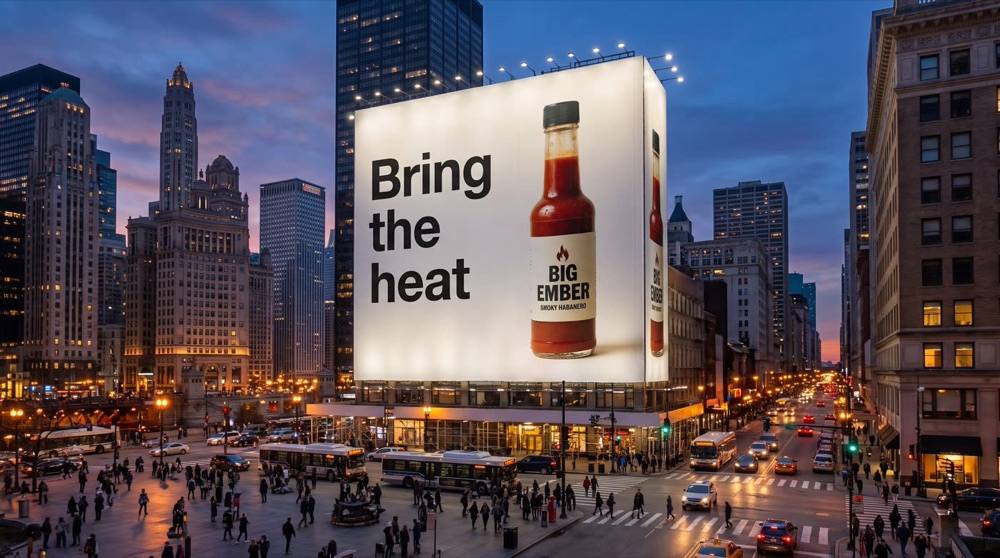
Get it on a giant billboard in a real-looking place, with your headline on it, as a picture and then a clip.
A billboard mockup shows a client, a boss or your followers what the campaign would look like out in the world. Hermoso builds the whole scene: the billboard, the city or the road around it, the light, the people walking past. Your product sits on it the way it really looks, and your headline is printed exactly as you type it.
How do I make a billboard mockup?
- Upload your picture. Your product, your logo or a finished ad. One clear picture.
- Pick where. A busy city square, a highway, a subway station, a rooftop or a desert road. Or describe your own place.
- Add a headline, if you want. Up to 40 characters, printed exactly as you type it. Leave it empty for a picture-only billboard.
- Press the button. The app shows the price first. Pick 16:9, 9:16, 1:1, 3:4 or 4:3.
Like the picture? Press Make it move under it and it becomes a 5-second clip. That step has its own price, shown on the button before you press it.
Is this a real billboard?
No, it is a mockup: an AI-made scene for pitching, planning or posting. Plenty of brands post "billboard" ads that never went up, because the picture alone gets attention. If you want a whole set of real ads for your feeds, try the AI image ad generator.
Can I do this from ChatGPT or Claude?
Yes. Connect the Hermoso MCP and ask for your product on a billboard in a busy city square. Your assistant runs the same effect through the make_effect tool, tells you the price first, and hands back the picture.
Related
Frequently asked questions
What can I put on the billboard?
Your product, your logo or a finished ad. One clear picture.
Can I add a headline?
Yes. Up to 40 characters, printed exactly as you type it.
Which places can I pick?
A busy city square, a highway, a subway station, a rooftop or a desert road. You can also describe your own.
Can it be a video?
Yes. Press Make it move under the picture for a 5-second clip, priced separately.
Is it free?
Hermoso has a free plan with no card. The app shows the exact price before anything runs.
Start free, no card needed. The app shows the exact price before anything runs.
Start free → See pricing